
About Us
One - stop Printed circuit board assembly Solution provider Keep Best PCB Assembly Co., Ltd serves many well-known brand customers in industrial control, security, medical, Internet of Things, automotive, artificial intelligence, smart home, power and communications industries at home and abroad. The company continues to be customer-centric, improves the level of digital intelligence, and is committed to meeting continued high-quality customer needs.
Get a free quote

BOM, DNP and Revision Checklist for PCBA
-
KeepBestPcba
-
Published
Updated
-
Views ()
BOM, DNP and Revision Checklist for PCBA
Prepare a PCBA BOM with fit and DNP status, reference designators, revision identifiers and supply responsibilities. Use the release and variant checklists.
Release one BOM for one assembly variant
For a useful PCBA quotation, identify the board revision, assembly variant and BOM revision together. List what should be fitted, what should remain unpopulated and who can approve a change. Send the matching placement data and assembly drawing with the same release identifier.
This checklist is for engineers and buyers preparing prototype, small-batch or repeat production data. It is a suggested handover method, not a claim that a particular CAD export is ready for production. Confirm the file format and review requirements with your assembly partner.
What does DNP mean in a PCBA BOM?
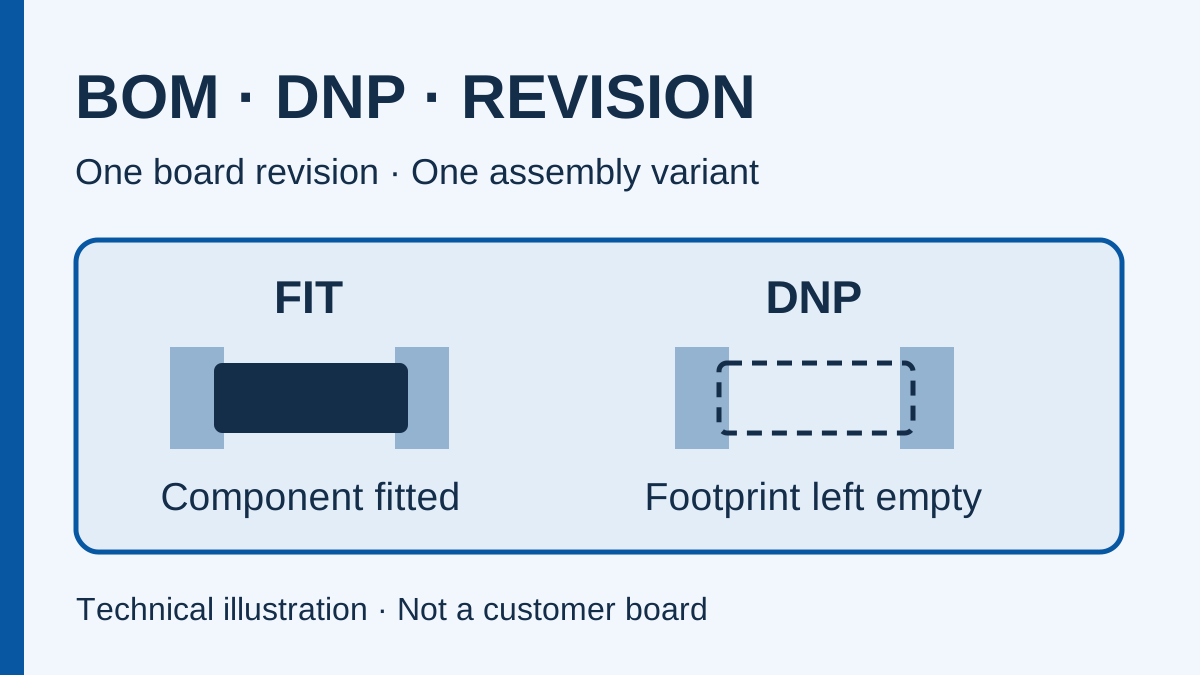
DNP means do not populate: the component is not to be fitted for the specified assembly variant. A footprint can still be present on the board. A blank manufacturer part number does not reliably communicate that instruction. State the fit status explicitly and identify the affected reference designators.
CAD export settings matter. KiCad distinguishes DNP, exclusion from a BOM and exclusion from the board; its export options can also omit DNP rows. Check the actual exported file rather than assuming every assembly option remains visible. See the KiCad Schematic Editor documentation for that tool's attribute definitions.
A practical BOM handover table
| Field | What to provide | What the reviewer checks |
|---|---|---|
| Release identity | Project, board revision, assembly variant and BOM revision | All manufacturing files refer to the intended release |
| Reference designators | Every fitted and deliberately unpopulated location | No duplicate location or unexplained gap between BOM and drawing |
| Quantity basis | Quantity per assembled board, with build quantity stated separately | A per-board quantity has not been mistaken for the purchasing total |
| Fit status | FIT or DNP for the named variant | A blank cell has not been treated as permission to omit a part |
| Component identity | Manufacturer and complete manufacturer part number for fitted parts | Ordering suffixes, package and specified options are explicit |
| Description and footprint | Readable description and design footprint identifier | Description, selected part and assembly data do not contradict each other |
| Supply responsibility | Customer-supplied, assembler-sourced or otherwise agreed | Each fitted line has an owner for procurement and shortage resolution |
| Alternatives and approval | Approved alternatives or a request-for-approval instruction | A sourcing suggestion cannot silently become a production substitution |
A DNP example that avoids an ambiguous blank row
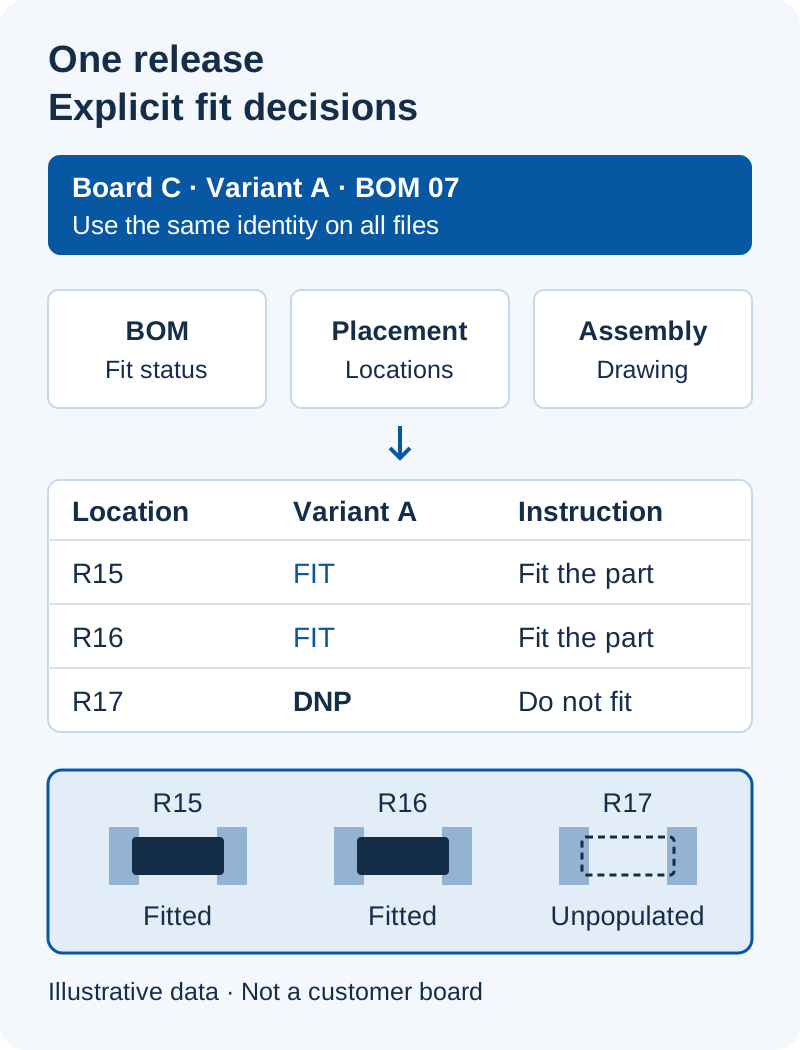
Suppose an illustrative controller board has two commercial variants. For variant A, R15 and R16 are fitted and R17 is DNP. For variant B, R15 is fitted while R16 and R17 are DNP. Keep those decisions in a variant table or release separate, clearly named BOMs. Do not send two unlabeled spreadsheets and expect the assembler to choose.
| Location | Variant A | Variant B | Handover action |
|---|---|---|---|
| R15 | FIT | FIT | Specify the approved part and quantity per board |
| R16 | FIT | DNP | Make the variant difference visible in the BOM and drawing |
| R17 | DNP | DNP | Retain a clear no-fit instruction for the footprint |
This is an invented configuration example, not a customer project or an electrical design recommendation. Your design owner must confirm the actual circuit behavior, firmware and test requirements for each variant.
Check the exported files before requesting a quote
- Freeze the release name. Put the same board revision and assembly variant in the BOM, placement export and assembly drawing. Include a short file manifest.
- Reconcile reference designators. Resolve duplicate locations, missing fitted parts and differences between the BOM and placement data. Record intentional exclusions instead of deleting unexplained rows.
- Separate quantity units. State quantities per board and the number of boards requested. Agree whether sourcing allowances, minimum purchase quantities and excess materials are included in the quote.
- Review fit options. Confirm that DNP settings survived export. Mark the matching drawing and explain any variant-specific test or firmware requirement.
- Define change authority. Name the role responsible for approving part changes. Refer to the component substitution approval guide when an exact part cannot be sourced.
- Close open questions. Keep unresolved lines in an issue list. Identify whether each quote assumes an answer or excludes the affected work.
Keep quotation review separate from production release
A quote can be prepared with clearly stated assumptions; a production order needs an approved configuration. If the BOM changes after quotation, identify the changed lines and ask whether sourcing, setup, testing or scheduling must be reviewed again. Reusing an old filename without a revision note makes that review harder.
For repeat orders, include the previously approved release and the proposed changes. For a transfer to a different manufacturing site, confirm the executing site and responsibility for inherited tooling, programs and test documents. An earlier successful build does not establish that a different release or site has already been approved.
Prepare the next project review
Use the PCBA RFQ checklist for the rest of the quotation package. Compare turnkey, consigned and hybrid material responsibilities, then review the component purchasing service scope.
Request a PCBA project review with your board revision, variant, build quantities and delivery country. Describe your project first; agree confidentiality and file-transfer arrangements with sales before sending design files. The enquiry form does not provide a BOM upload field.
Prepared by KeepBestPCBA editorial team. The release tables are suggested project worksheets. Tool-specific DNP terminology is referenced to the KiCad documentation; project acceptance remains subject to your approved design and agreed manufacturing review.
Recent Post


Ask a PCBA question
Your question is sent privately to our team. Required fields are marked *.